---
title: Changing Your Password From the App
description: If you know your password, you can reset it through your account profile in the app by following the instructions below.
---
[Skip to content](https://support.zello.com/zc/changing-your-password-from-the-app#main-content)
English
Show submenu for translations

Open main navigation
Close main navigation
- English
Show submenu for translations
- Contact us
Contact us
How can we help you?
- There are no suggestions because the search field is empty.
1. [Zello F&F](https://support.zello.com/zc?hsLang=en)
2. [Profile Preferences and Settings](https://support.zello.com/zc/profile-preferences-and-settings?hsLang=en)
3. [Manage account](https://support.zello.com/zc/profile-preferences-and-settings?hsLang=en#manage-account)
July 6, 2026
# Changing Your Password From the App
This article is written for: ❌ Zello Work ✅ Zello Friends & Family
If you know your password, you can reset it through your account profile in the app by following the instructions below.
- 1\. Tap your **profile picture** in the top left corner of the screen.
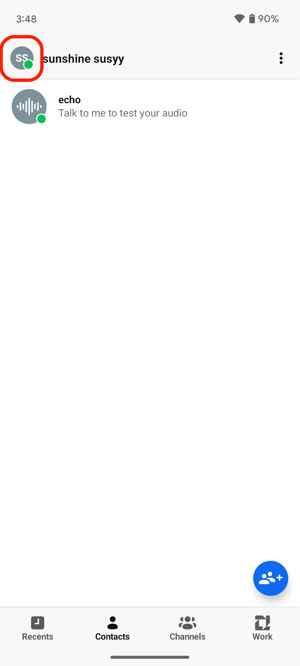
2\. Select **Profile**.
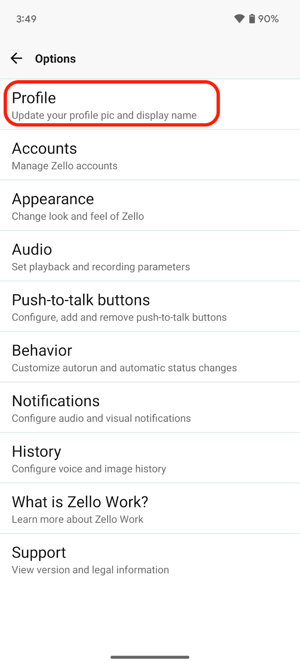
3\. Select **Change password**.
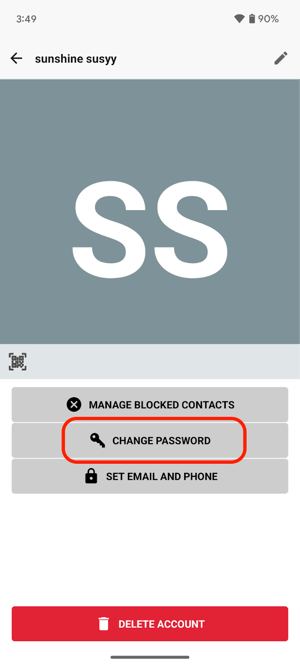
4\. Input and save your new password.
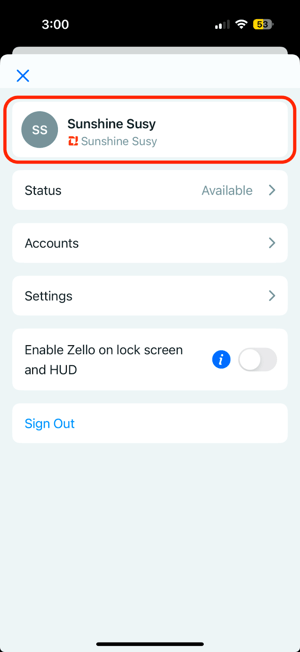
- 1\. Tap your **profile picture** in the top left corner of the screen.
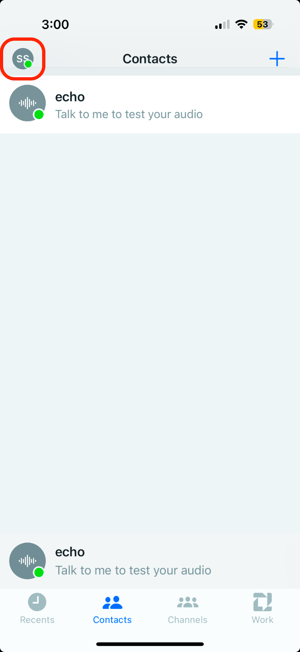
2\. Tap the banner with your username at the top of the screen.
3\. Select **Change password**.
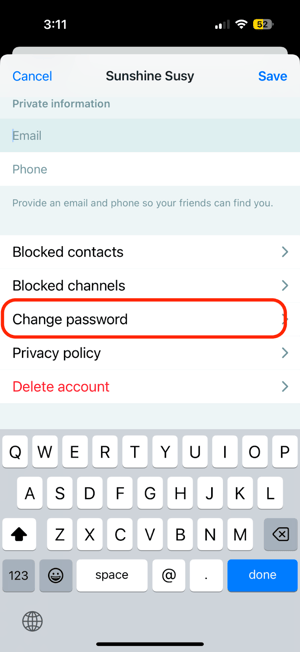
4\. Input and save your new password.
If you do not know your password, you can reset your password [here](https://zello.com/forgot_password) using the email address associated with your Zello account. For help resetting your password using your email address, please reference this [support article](https://support.zello.com/hc/en-us/articles/360046653612-Forgotten-Password-Username?hsLang=en).
- [Getting started](https://support.zello.com/zc/getting-started?hsLang=en#main-content)
- [New users](https://support.zello.com/zc/getting-started?hsLang=en#new-users)
- [General information](https://support.zello.com/zc/getting-started?hsLang=en#general-information)
- [Using Zello Friends & Family](https://support.zello.com/zc/using-zello-friends-family?hsLang=en#main-content)
- [Android](https://support.zello.com/zc/using-zello-friends-family?hsLang=en#android)
- [iOS](https://support.zello.com/zc/using-zello-friends-family?hsLang=en#ios)
- [Features](https://support.zello.com/zc/using-zello-friends-family?hsLang=en#features)
- [Channels](https://support.zello.com/zc/using-zello-friends-family?hsLang=en#channels)
- [Contacts](https://support.zello.com/zc/using-zello-friends-family?hsLang=en#contacts)
- [Hardware and accessories](https://support.zello.com/zc/using-zello-friends-family?hsLang=en#hardware-and-accessories)
- [Profile Preferences and Settings](https://support.zello.com/zc/profile-preferences-and-settings?hsLang=en#main-content)
- [Manage account](https://support.zello.com/zc/profile-preferences-and-settings?hsLang=en#manage-account)
- [Zello statuses](https://support.zello.com/zc/profile-preferences-and-settings?hsLang=en#zello-statuses)
- [Settings](https://support.zello.com/zc/profile-preferences-and-settings?hsLang=en#settings)
- [Safety and Privacy](https://support.zello.com/zc/safety-and-privacy?hsLang=en#main-content)
- [Blocking, reporting, and channel moderation](https://support.zello.com/zc/safety-and-privacy?hsLang=en#blocking-reporting-and-channel-moderation)
- [Legal](https://support.zello.com/zc/safety-and-privacy?hsLang=en#legal)
- [Channel blocks and account bans](https://support.zello.com/zc/safety-and-privacy?hsLang=en#channel-blocks-and-account-bans)
- [Account security](https://support.zello.com/zc/safety-and-privacy?hsLang=en#account-security)
- [Privacy](https://support.zello.com/zc/safety-and-privacy?hsLang=en#privacy)
- [Mobile and Desktop Apps](https://support.zello.com/zc/mobile-and-desktop-apps?hsLang=en#main-content)
- [Zello Bridge](https://support.zello.com/zc/mobile-and-desktop-apps?hsLang=en#zello-bridge)
[](https://zello.com)
[mailto:email@email.com](mailto:email@email.com)
Copyright © 2026, Zello