---
title: Deleting History
description: For information about history storage on Zello Work, please reference this support article.
---
[Skip to content](https://support.zello.com/zc/deleting-history#main-content)
English
Show submenu for translations

Open main navigation
Close main navigation
- English
Show submenu for translations
- Contact us
Contact us
How can we help you?
- There are no suggestions because the search field is empty.
1. [Zello F&F](https://support.zello.com/zc?hsLang=en)
2. [Using Zello Friends & Family](https://support.zello.com/zc/using-zello-friends-family?hsLang=en)
3. [Features](https://support.zello.com/zc/using-zello-friends-family?hsLang=en#features)
July 6, 2026
# Deleting History
This article is written for: ❌ Zello Work ✅ Zello Friends & Family
Zello stores your conversation history with your channels and contacts on the individual device where the messages were received. To delete your History, follow the instructions below.
Once messages have been deleted from your History, they cannot be restored.
### iPhone Version
### From Channel/Contact History Screen
1. Press and hold the message you wish to delete.
2. Select **Delete** from the menu that appears.
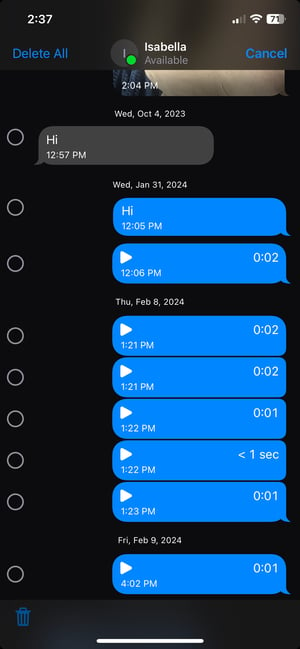
3. If you wish to delete messages in bulk or your entire History with a channel or contact, press and hold a message and select **More**.
4. You can then select messages manually using the circles that appear to the left of each message or select **Delete All** in the top left corner.
### From Settings
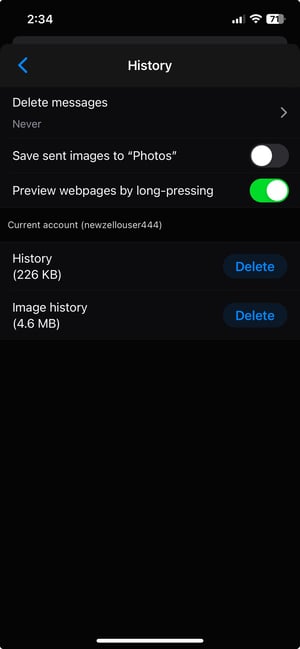
1. Select **History**.
2. From the History menu, you can delete either your entire conversation history (with all contacts and channels) or your image history (with all contacts and channels).
### Android Version
### From Channel/Contact History Screen
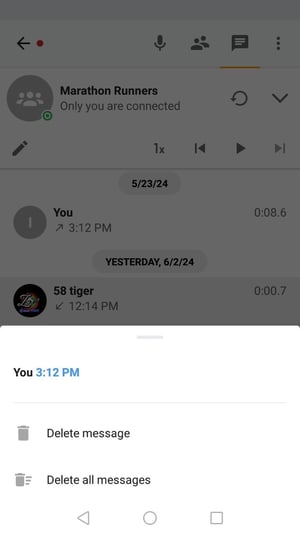
1. Press and hold a message.
2. To delete a single message, select **Delete message**.
3. To delete your entire History with that channel or contact, select **Delete all messages.**
### From Options
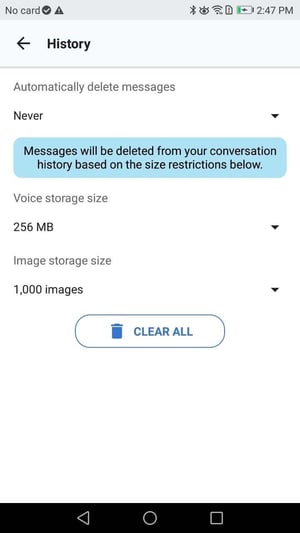
1. Select **History**.
2. To delete your History with all contacts and channels, select **Clear All**.
3. You can also adjust your storage limits and set messages to delete after a certain period of time.
- [Getting started](https://support.zello.com/zc/getting-started?hsLang=en#main-content)
- [New users](https://support.zello.com/zc/getting-started?hsLang=en#new-users)
- [General information](https://support.zello.com/zc/getting-started?hsLang=en#general-information)
- [Using Zello Friends & Family](https://support.zello.com/zc/using-zello-friends-family?hsLang=en#main-content)
- [Android](https://support.zello.com/zc/using-zello-friends-family?hsLang=en#android)
- [iOS](https://support.zello.com/zc/using-zello-friends-family?hsLang=en#ios)
- [Features](https://support.zello.com/zc/using-zello-friends-family?hsLang=en#features)
- [Channels](https://support.zello.com/zc/using-zello-friends-family?hsLang=en#channels)
- [Contacts](https://support.zello.com/zc/using-zello-friends-family?hsLang=en#contacts)
- [Hardware and accessories](https://support.zello.com/zc/using-zello-friends-family?hsLang=en#hardware-and-accessories)
- [Profile Preferences and Settings](https://support.zello.com/zc/profile-preferences-and-settings?hsLang=en#main-content)
- [Manage account](https://support.zello.com/zc/profile-preferences-and-settings?hsLang=en#manage-account)
- [Zello statuses](https://support.zello.com/zc/profile-preferences-and-settings?hsLang=en#zello-statuses)
- [Settings](https://support.zello.com/zc/profile-preferences-and-settings?hsLang=en#settings)
- [Safety and Privacy](https://support.zello.com/zc/safety-and-privacy?hsLang=en#main-content)
- [Blocking, reporting, and channel moderation](https://support.zello.com/zc/safety-and-privacy?hsLang=en#blocking-reporting-and-channel-moderation)
- [Legal](https://support.zello.com/zc/safety-and-privacy?hsLang=en#legal)
- [Channel blocks and account bans](https://support.zello.com/zc/safety-and-privacy?hsLang=en#channel-blocks-and-account-bans)
- [Account security](https://support.zello.com/zc/safety-and-privacy?hsLang=en#account-security)
- [Privacy](https://support.zello.com/zc/safety-and-privacy?hsLang=en#privacy)
- [Mobile and Desktop Apps](https://support.zello.com/zc/mobile-and-desktop-apps?hsLang=en#main-content)
- [Zello Bridge](https://support.zello.com/zc/mobile-and-desktop-apps?hsLang=en#zello-bridge)
[](https://zello.com)
[mailto:email@email.com](mailto:email@email.com)
Copyright © 2026, Zello