---
title: Disabling Talk Screen PTT Button
description: For help disabling the screen button on Zello Work, please reference this support article.
---
[Skip to content](https://support.zello.com/zc/disabling-talk-screen-ptt-button#main-content)
English
Show submenu for translations

Open main navigation
Close main navigation
- English
Show submenu for translations
- Contact us
Contact us
How can we help you?
- There are no suggestions because the search field is empty.
1. [Zello F&F](https://support.zello.com/zc?hsLang=en)
2. [Profile Preferences and Settings](https://support.zello.com/zc/profile-preferences-and-settings?hsLang=en)
3. [Settings](https://support.zello.com/zc/profile-preferences-and-settings?hsLang=en#settings)
July 6, 2026
# Disabling Talk Screen PTT Button
This article is written for: ❌ Zello Work ✅ Zello Friends & Family
**For help disabling the screen button on Zello Work, please reference this [support article](https://paidsupport.zello.com/hc/en-us/articles/26987136794381-How-do-I-disable-the-screen-button).**
If you are using an external PTT button, you may wish to disable the PTT button on your device to prevent accidental transmissions. To do so, follow the instructions below according to the type of device you're using.
#### Android
1. Tap the **three dots icon** in the top right corner of the screen.
2. Select **Options**.
3. Select **Push-to-talk buttons**.
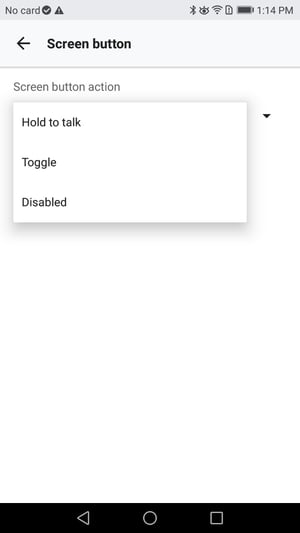
4. Tap **Screen button**.
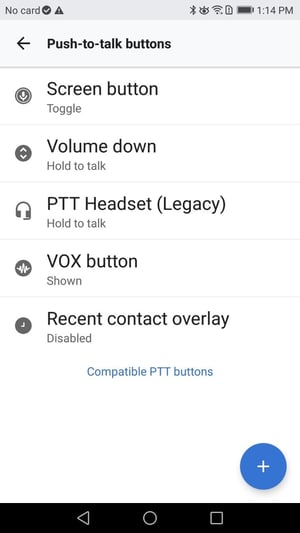
5. From the Screen button action menu, select **Disabled**.
#### iOS
1. Tap your **profile picture** in the top left corner of the screen.
2. Select **Settings**.
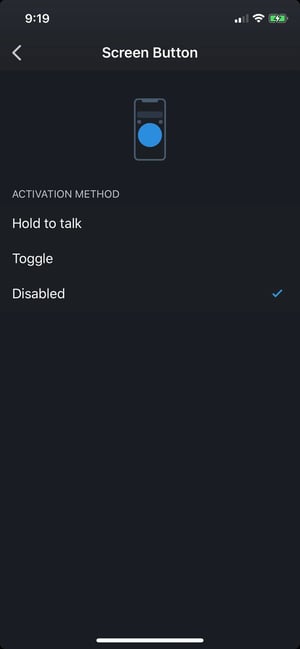
3. Tap **Screen Button**.
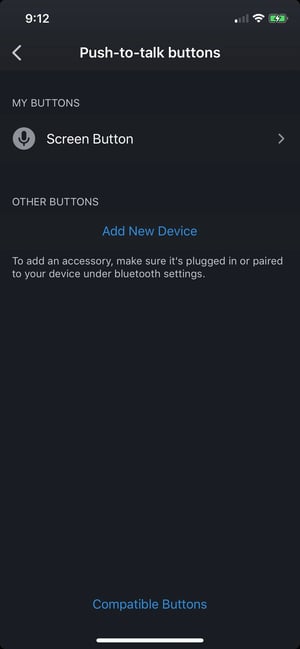
4. From the Activation Method menu, select **Disabled**.
- [Getting started](https://support.zello.com/zc/getting-started?hsLang=en#main-content)
- [New users](https://support.zello.com/zc/getting-started?hsLang=en#new-users)
- [General information](https://support.zello.com/zc/getting-started?hsLang=en#general-information)
- [Using Zello Friends & Family](https://support.zello.com/zc/using-zello-friends-family?hsLang=en#main-content)
- [Android](https://support.zello.com/zc/using-zello-friends-family?hsLang=en#android)
- [iOS](https://support.zello.com/zc/using-zello-friends-family?hsLang=en#ios)
- [Features](https://support.zello.com/zc/using-zello-friends-family?hsLang=en#features)
- [Channels](https://support.zello.com/zc/using-zello-friends-family?hsLang=en#channels)
- [Contacts](https://support.zello.com/zc/using-zello-friends-family?hsLang=en#contacts)
- [Hardware and accessories](https://support.zello.com/zc/using-zello-friends-family?hsLang=en#hardware-and-accessories)
- [Profile Preferences and Settings](https://support.zello.com/zc/profile-preferences-and-settings?hsLang=en#main-content)
- [Manage account](https://support.zello.com/zc/profile-preferences-and-settings?hsLang=en#manage-account)
- [Zello statuses](https://support.zello.com/zc/profile-preferences-and-settings?hsLang=en#zello-statuses)
- [Settings](https://support.zello.com/zc/profile-preferences-and-settings?hsLang=en#settings)
- [Safety and Privacy](https://support.zello.com/zc/safety-and-privacy?hsLang=en#main-content)
- [Blocking, reporting, and channel moderation](https://support.zello.com/zc/safety-and-privacy?hsLang=en#blocking-reporting-and-channel-moderation)
- [Legal](https://support.zello.com/zc/safety-and-privacy?hsLang=en#legal)
- [Channel blocks and account bans](https://support.zello.com/zc/safety-and-privacy?hsLang=en#channel-blocks-and-account-bans)
- [Account security](https://support.zello.com/zc/safety-and-privacy?hsLang=en#account-security)
- [Privacy](https://support.zello.com/zc/safety-and-privacy?hsLang=en#privacy)
- [Mobile and Desktop Apps](https://support.zello.com/zc/mobile-and-desktop-apps?hsLang=en#main-content)
- [Zello Bridge](https://support.zello.com/zc/mobile-and-desktop-apps?hsLang=en#zello-bridge)
[](https://zello.com)
[mailto:email@email.com](mailto:email@email.com)
Copyright © 2026, Zello