---
title: Location Sharing
description: Location sharing allows you to send your exact location to both contacts and channels. Recipients will receive your exact address accompanied by a timestamp...
---
[Skip to content](https://support.zello.com/zc/location-sharing#main-content)
English
Show submenu for translations

Open main navigation
Close main navigation
- English
Show submenu for translations
- Contact us
Contact us
How can we help you?
- There are no suggestions because the search field is empty.
1. [Zello F&F](https://support.zello.com/zc?hsLang=en)
2. [Using Zello Friends & Family](https://support.zello.com/zc/using-zello-friends-family?hsLang=en)
3. [Features](https://support.zello.com/zc/using-zello-friends-family?hsLang=en#features)
July 6, 2026
# Location Sharing
This article is written for: ❌ Zello Work ✅ Zello Friends & Family
Location sharing allows you to send your exact location to both contacts and channels. Recipients will receive your exact address accompanied by a timestamp and map view of that address.
To share your location, follow the instructions below for the type of device you're using.
Make sure you have granted permission for Zello to access your location from your device's settings.
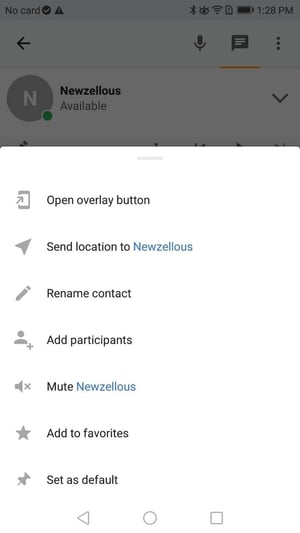
#### Android
1. Open the talk screen of the channel or contact you wish to share your location with.
2. Tap the **drop-down arrow** to the right of the contact or channel name.
3. Select **Send location**.
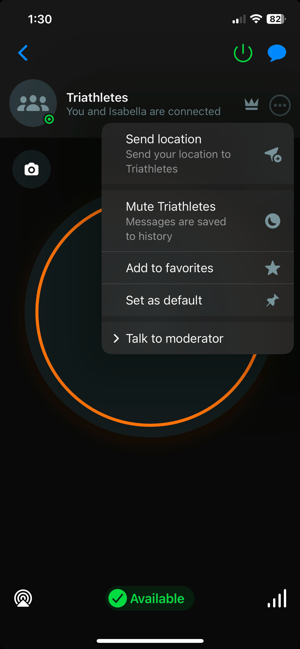
#### iOS
1. Open the talk screen of the channel or contact you wish to share your location with.
2. Tap the **horizontal dots icon** to the right of the contact or channel name.
3. Select **Send location**.
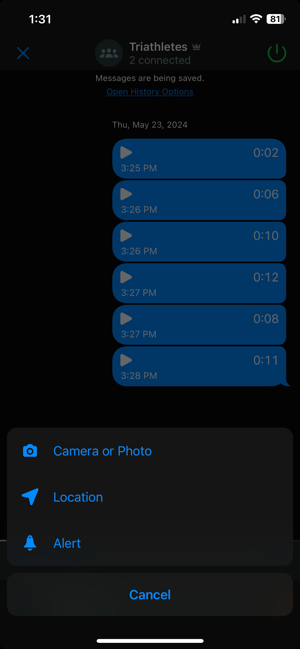
Alternatively, you can send your location from the channel or contact history screen. Tap the **+ icon** to the left of the message field and then select **Location**.
- [Getting started](https://support.zello.com/zc/getting-started?hsLang=en#main-content)
- [New users](https://support.zello.com/zc/getting-started?hsLang=en#new-users)
- [General information](https://support.zello.com/zc/getting-started?hsLang=en#general-information)
- [Using Zello Friends & Family](https://support.zello.com/zc/using-zello-friends-family?hsLang=en#main-content)
- [Android](https://support.zello.com/zc/using-zello-friends-family?hsLang=en#android)
- [iOS](https://support.zello.com/zc/using-zello-friends-family?hsLang=en#ios)
- [Features](https://support.zello.com/zc/using-zello-friends-family?hsLang=en#features)
- [Channels](https://support.zello.com/zc/using-zello-friends-family?hsLang=en#channels)
- [Contacts](https://support.zello.com/zc/using-zello-friends-family?hsLang=en#contacts)
- [Hardware and accessories](https://support.zello.com/zc/using-zello-friends-family?hsLang=en#hardware-and-accessories)
- [Profile Preferences and Settings](https://support.zello.com/zc/profile-preferences-and-settings?hsLang=en#main-content)
- [Manage account](https://support.zello.com/zc/profile-preferences-and-settings?hsLang=en#manage-account)
- [Zello statuses](https://support.zello.com/zc/profile-preferences-and-settings?hsLang=en#zello-statuses)
- [Settings](https://support.zello.com/zc/profile-preferences-and-settings?hsLang=en#settings)
- [Safety and Privacy](https://support.zello.com/zc/safety-and-privacy?hsLang=en#main-content)
- [Blocking, reporting, and channel moderation](https://support.zello.com/zc/safety-and-privacy?hsLang=en#blocking-reporting-and-channel-moderation)
- [Legal](https://support.zello.com/zc/safety-and-privacy?hsLang=en#legal)
- [Channel blocks and account bans](https://support.zello.com/zc/safety-and-privacy?hsLang=en#channel-blocks-and-account-bans)
- [Account security](https://support.zello.com/zc/safety-and-privacy?hsLang=en#account-security)
- [Privacy](https://support.zello.com/zc/safety-and-privacy?hsLang=en#privacy)
- [Mobile and Desktop Apps](https://support.zello.com/zc/mobile-and-desktop-apps?hsLang=en#main-content)
- [Zello Bridge](https://support.zello.com/zc/mobile-and-desktop-apps?hsLang=en#zello-bridge)
[](https://zello.com)
[mailto:email@email.com](mailto:email@email.com)
Copyright © 2026, Zello