---
title: Set up a Bluetooth LE button
description: What about Set UP for Android Phones?
---
[Skip to content](https://support.zello.com/zc/set-up-a-bluetooth-le-button#main-content)
English
Show submenu for translations

Open main navigation
Close main navigation
- English
Show submenu for translations
- Contact us
Contact us
How can we help you?
- There are no suggestions because the search field is empty.
1. [Zello F&F](https://support.zello.com/zc?hsLang=en)
2. [Using Zello Friends & Family](https://support.zello.com/zc/using-zello-friends-family?hsLang=en)
3. [Hardware and accessories](https://support.zello.com/zc/using-zello-friends-family?hsLang=en#hardware-and-accessories)
July 11, 2026
# Set up a Bluetooth LE button
This article is written for: ❌ Zello Work ✅ Zello Friends & Family
A Bluetooth Low Energy (BLE) push-to-talk (PTT) button lets you talk on Zello without holding the on-screen talk button, or while Zello runs in the background. This guide shows you how to pair a BLE accessory and add its button to Zello on your iPhone or iPad.
### **Before you start**
- **Use a supported accessory.** Zello only recognizes BLE buttons it has certified. Check the [Zello certified hardware page](https://zello.com/hardware/headsets-buttons-mics/) to confirm your device is supported before setting it up.
- **Charge the accessory** and turn it on.
- **Make sure the button isn't already paired to another phone or tablet.** A BLE button that's still bonded to another device often won't be discovered. If needed, reset the accessory following the manufacturer's instructions before you begin.
### **Step 1: Pair the accessory with your device**
Following the manufacturer's instructions, put the accessory in pairing mode and pair it with your iPhone or iPad.
### **Step 2: Add the button in Zello**
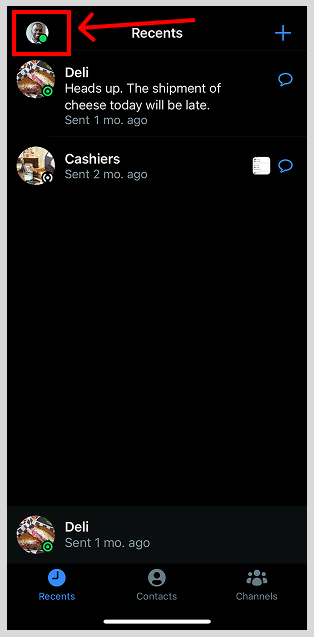
1. Open Zello and tap your **profile picture** in the top-left corner.
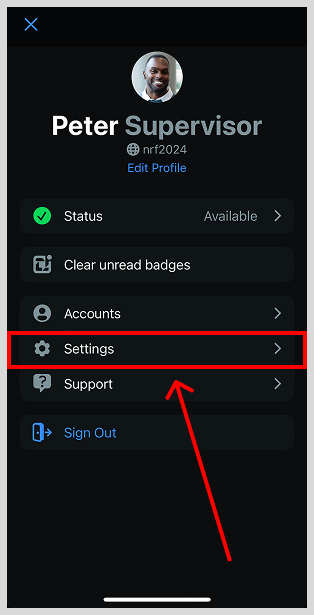
2. Select **Settings**.
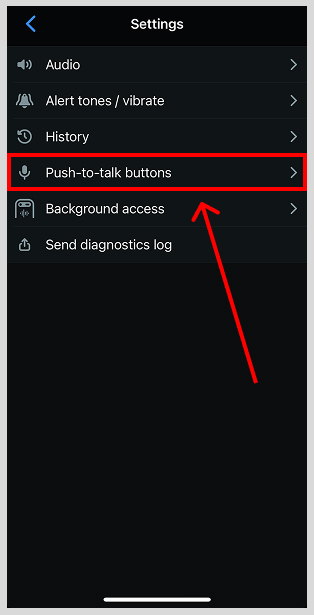
3. Select **Push-to-talk buttons**.
4. Tap **Add New Device**. Your accessory's name will appear.
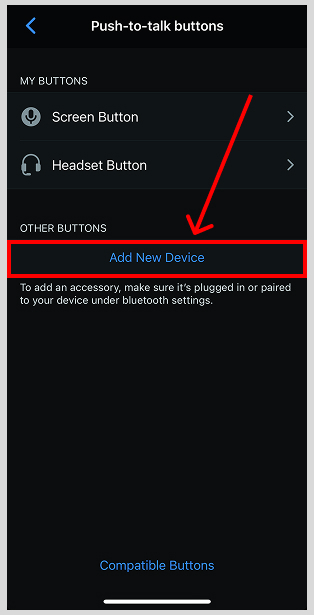
5. When prompted, press and release the button on your accessory that you want to use for push-to-talk. Zello detects the press and adds that button to your Push-to-talk buttons list, where it now appears.
### **Step 3: Test the button**
Open the **Echo** contact and press your accessory's button to record a short message. Echo plays your message back to you, so you'll immediately know the button is transmitting correctly.
### **Optional: Assign the button to a specific contact or channel**
By default, the button sends to whichever contact or channel screen you last had open. To lock it to one recipient:
1. Go to **Settings \> Push-to-talk buttons** and tap your accessory's name.
2. Open the button's contact menu and tap **Select**.
3. Choose the contact or channel you want the button to always talk to.
### **Troubleshooting**
- **Your accessory doesn't appear under Add New Device**: Confirm it's a [certified Zello accessory](https://zello.com/hardware/headsets-buttons-mics/), that it's charged and in pairing mode, and that it isn't still connected to another phone. Toggling Bluetooth off and on, or restarting the app, can also help.
- **The button paired but won't transmit or keeps disconnecting**: Power-cycle the accessory, then remove it from the **Push-to-talk buttons** list and add it again. If it still won't reconnect, restart your device.
- [Getting started](https://support.zello.com/zc/getting-started?hsLang=en#main-content)
- [New users](https://support.zello.com/zc/getting-started?hsLang=en#new-users)
- [General information](https://support.zello.com/zc/getting-started?hsLang=en#general-information)
- [Using Zello Friends & Family](https://support.zello.com/zc/using-zello-friends-family?hsLang=en#main-content)
- [Android](https://support.zello.com/zc/using-zello-friends-family?hsLang=en#android)
- [iOS](https://support.zello.com/zc/using-zello-friends-family?hsLang=en#ios)
- [Features](https://support.zello.com/zc/using-zello-friends-family?hsLang=en#features)
- [Channels](https://support.zello.com/zc/using-zello-friends-family?hsLang=en#channels)
- [Contacts](https://support.zello.com/zc/using-zello-friends-family?hsLang=en#contacts)
- [Hardware and accessories](https://support.zello.com/zc/using-zello-friends-family?hsLang=en#hardware-and-accessories)
- [Profile Preferences and Settings](https://support.zello.com/zc/profile-preferences-and-settings?hsLang=en#main-content)
- [Manage account](https://support.zello.com/zc/profile-preferences-and-settings?hsLang=en#manage-account)
- [Zello statuses](https://support.zello.com/zc/profile-preferences-and-settings?hsLang=en#zello-statuses)
- [Settings](https://support.zello.com/zc/profile-preferences-and-settings?hsLang=en#settings)
- [Safety and Privacy](https://support.zello.com/zc/safety-and-privacy?hsLang=en#main-content)
- [Blocking, reporting, and channel moderation](https://support.zello.com/zc/safety-and-privacy?hsLang=en#blocking-reporting-and-channel-moderation)
- [Legal](https://support.zello.com/zc/safety-and-privacy?hsLang=en#legal)
- [Channel blocks and account bans](https://support.zello.com/zc/safety-and-privacy?hsLang=en#channel-blocks-and-account-bans)
- [Account security](https://support.zello.com/zc/safety-and-privacy?hsLang=en#account-security)
- [Privacy](https://support.zello.com/zc/safety-and-privacy?hsLang=en#privacy)
- [Mobile and Desktop Apps](https://support.zello.com/zc/mobile-and-desktop-apps?hsLang=en#main-content)
- [Zello Bridge](https://support.zello.com/zc/mobile-and-desktop-apps?hsLang=en#zello-bridge)
[](https://zello.com)
[mailto:email@email.com](mailto:email@email.com)
Copyright © 2026, Zello