---
title: Siyata SD7 (Zello Friends and Family)
description: For help setting up the Siyata SD7 with Zello Work, please reference this support article.
---
[Skip to content](https://support.zello.com/zc/siyata-sd7-zello-friends-and-family#main-content)
English
Show submenu for translations

Open main navigation
Close main navigation
- English
Show submenu for translations
- Contact us
Contact us
How can we help you?
- There are no suggestions because the search field is empty.
1. [Zello F&F](https://support.zello.com/zc?hsLang=en)
2. [Using Zello Friends & Family](https://support.zello.com/zc/using-zello-friends-family?hsLang=en)
3. [Hardware and accessories](https://support.zello.com/zc/using-zello-friends-family?hsLang=en#hardware-and-accessories)
July 6, 2026
# Siyata SD7 (Zello Friends and Family)
This article is written for: ❌ Zello Work ✅ Zello Friends & Family
**For help setting up the Siyata SD7 with Zello Work, please reference this [support article](https://paidsupport.zello.com/hc/en-us/articles/28539531211533-Siyata-SD7-Zello-Work).**
The [Siyata SD7](https://siyata7.com/static/version1683309823/frontend/Skynix/Siyata/en_US/pdf/SD7_UG_NA_EN.pdf) is an Android-based, PTT-over-cellular device that meets mission-critical industry standards. Unlike a traditional 2-way radio, the SD7—which utilizes a radio form factor—leverages cellular data plans so that connection is clear, robust, and consistent, even in extreme environments.
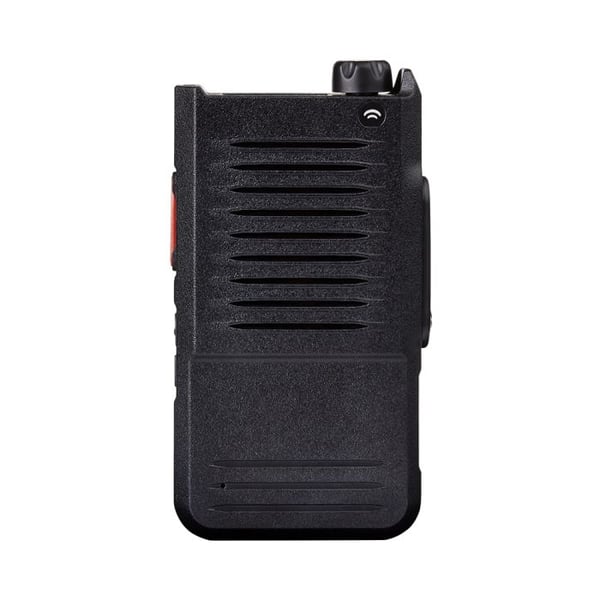
### Siyata SD7 Features
Zello Friends & Family users may find the following SD7 features especially useful.
#### Rotary knob
The rotary knob (often referred to as a channel knob) allows users to easily switch between communication streams.
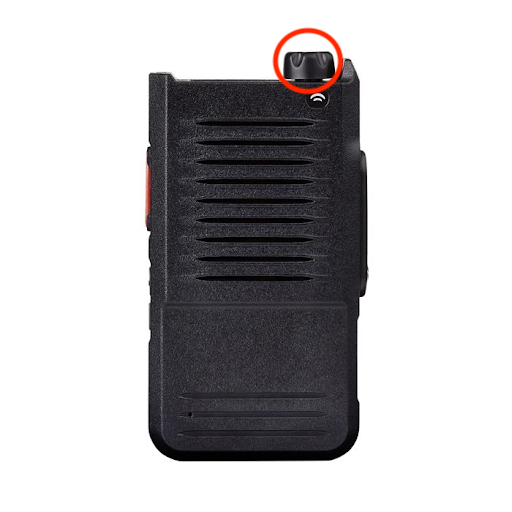Additionally, SD7 users retain the ability to configure channel name announcements that occur when using the knob. By default, channel names are announced when you turn the hardware knob so that you're aware of who you're speaking to; if desired, this audio can be disabled.
To configure the channel name announcements setting, open the **PTT** menu on the Siyata. Scroll until you reach the "Channel Announcement" option, then press down on the knob to open the submenu and adjust the setting.
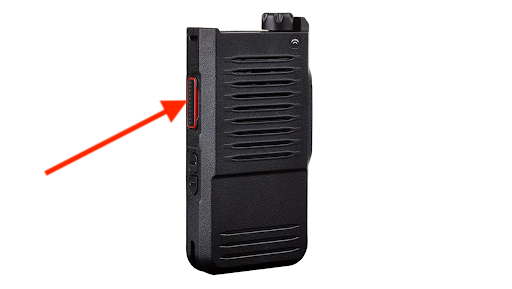
#### Hardware PTT button
Use the PTT button to transmit messages over Zello.
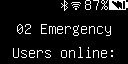
#### OLED screen
The OLED screen will display the currently selected channel/contact, the currently active channel/contact, and incoming alerts/messages.
#### Indicator light
This light will flash red when you’re transmitting a message, and green when you’re receiving a message. It's located at the top of the device, next to the hardware knob.
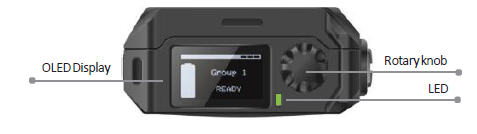
To buy the SD7 or its compatible accessories, [visit Siyata's website](https://siyata7.com/). For additional help with the SD7, see its [user guide](https://siyata7.com/static/version1683309823/frontend/Skynix/Siyata/en_US/pdf/SD7_UG_NA_EN.pdf).
Zello Friends & Family should manually set up and provision their SD7 using the instructions below.
### Manual Setup and Provisioning
1. Install Zello's Android app on your Siyata SD7. This can be done in one of two ways:
- Contact Siyata and request they deploy Zello to your device.
**OR**
2. - Use an [adb](https://www.makeuseof.com/install-apps-via-adb-android/) tool to install Zello's APK on your SD7.
**Please note:** The SD7 is managed by Siyata. For this reason, it's not available in the Google Play store.
3. Connect the SD7 to your PC or Mac using a USBC cable.
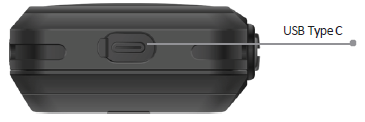
4. Use [scrcpy](https://github.com/Genymobile/scrcpy) (available for PC and Mac; free and open source) or [Vysor](https://www.vysor.io/) (PC and Mac; limited free trial) to establish a remote desktop connection with your SD7.
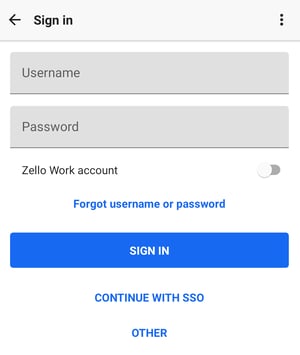
5. Open the Zello app. Enter your username and password, then select **Sign In**.
- [Getting started](https://support.zello.com/zc/getting-started?hsLang=en#main-content)
- [New users](https://support.zello.com/zc/getting-started?hsLang=en#new-users)
- [General information](https://support.zello.com/zc/getting-started?hsLang=en#general-information)
- [Using Zello Friends & Family](https://support.zello.com/zc/using-zello-friends-family?hsLang=en#main-content)
- [Android](https://support.zello.com/zc/using-zello-friends-family?hsLang=en#android)
- [iOS](https://support.zello.com/zc/using-zello-friends-family?hsLang=en#ios)
- [Features](https://support.zello.com/zc/using-zello-friends-family?hsLang=en#features)
- [Channels](https://support.zello.com/zc/using-zello-friends-family?hsLang=en#channels)
- [Contacts](https://support.zello.com/zc/using-zello-friends-family?hsLang=en#contacts)
- [Hardware and accessories](https://support.zello.com/zc/using-zello-friends-family?hsLang=en#hardware-and-accessories)
- [Profile Preferences and Settings](https://support.zello.com/zc/profile-preferences-and-settings?hsLang=en#main-content)
- [Manage account](https://support.zello.com/zc/profile-preferences-and-settings?hsLang=en#manage-account)
- [Zello statuses](https://support.zello.com/zc/profile-preferences-and-settings?hsLang=en#zello-statuses)
- [Settings](https://support.zello.com/zc/profile-preferences-and-settings?hsLang=en#settings)
- [Safety and Privacy](https://support.zello.com/zc/safety-and-privacy?hsLang=en#main-content)
- [Blocking, reporting, and channel moderation](https://support.zello.com/zc/safety-and-privacy?hsLang=en#blocking-reporting-and-channel-moderation)
- [Legal](https://support.zello.com/zc/safety-and-privacy?hsLang=en#legal)
- [Channel blocks and account bans](https://support.zello.com/zc/safety-and-privacy?hsLang=en#channel-blocks-and-account-bans)
- [Account security](https://support.zello.com/zc/safety-and-privacy?hsLang=en#account-security)
- [Privacy](https://support.zello.com/zc/safety-and-privacy?hsLang=en#privacy)
- [Mobile and Desktop Apps](https://support.zello.com/zc/mobile-and-desktop-apps?hsLang=en#main-content)
- [Zello Bridge](https://support.zello.com/zc/mobile-and-desktop-apps?hsLang=en#zello-bridge)
[](https://zello.com)
[mailto:email@email.com](mailto:email@email.com)
Copyright © 2026, Zello