---
title: Understanding Statuses
description: For help managing your status on Zello Work, please reference this support article.
---
[Skip to content](https://support.zello.com/zc/understanding-statuses#main-content)
English
Show submenu for translations

Open main navigation
Close main navigation
- English
Show submenu for translations
- Contact us
Contact us
How can we help you?
- There are no suggestions because the search field is empty.
1. [Zello F&F](https://support.zello.com/zc?hsLang=en)
2. [Profile Preferences and Settings](https://support.zello.com/zc/profile-preferences-and-settings?hsLang=en)
3. [Zello statuses](https://support.zello.com/zc/profile-preferences-and-settings?hsLang=en#zello-statuses)
July 6, 2026
# Understanding Statuses
This article is written for: ❌ Zello Work ✅ Zello Friends & Family
**For help managing your status on Zello Work, please reference this [support article](https://paidsupport.zello.com/hc/en-us/articles/26955879092877-Managing-your-Status).**
Statuses allow you to customize how you receive messages on Zello and whether you hear them live or not. You can choose from the following statuses: **Available**, **Busy**, **Solo** and **Offline** (**Standby**).
### Status Meanings
When your status is **Available**, all incoming messages play in real-time. Available contacts will have a **green dot** icon on their profile photo.
If you do not want to be disturbed, set your status to **Busy** to mute audio and save your messages to History. Busy contacts will have an **orange dot** icon on their profile photo.
When you set your status to **Offline**, others will see you in **Standby** mode. When a contact is in **Standby** mode, they will be notified of any messages they received when they log back in. Contacts on **Standby** will have a **green unfilled circle** icon on their profile photo.
If you would like to listen or talk to one contact or channel while muting conversations from others, set your status to **Solo**. You can replay any missed conversations from History at a later time.
### Updates
Below is a list of the status icon changes you will see on Zello starting with version 5.25.1.
The **Available** icon previously appeared as a green checkmark. Now, it is a simple green dot.

*Old icon*
****
*New icon*
Previously, different channel types and ad hoc conversations appeared with different icons. Now, all connected channels and group conversations will use the same icon.
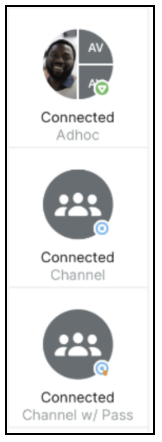
*Old icon*
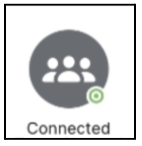
*New icon*
All disconnected conversations with more than one person will also use the same icon.
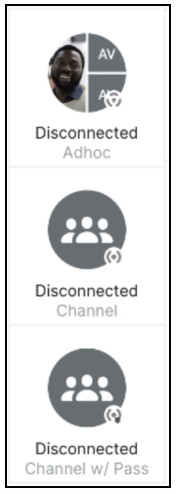
*Old icon*
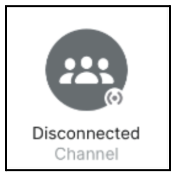
*New icon*
Previously, when a user had not yet accepted a contact request, they appeared with a pending icon. Now, they will not have a status icon.
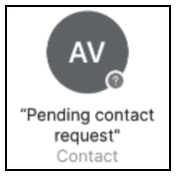
*Old icon*
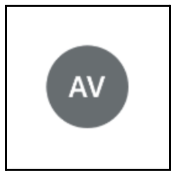
*New icon*
Previously, when a user went offline, their contacts and channels still appeared with status icons. Now, while offline, contacts and channels will show no status.
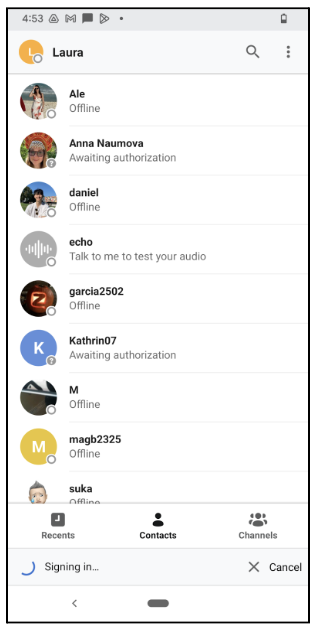
*Old icon*
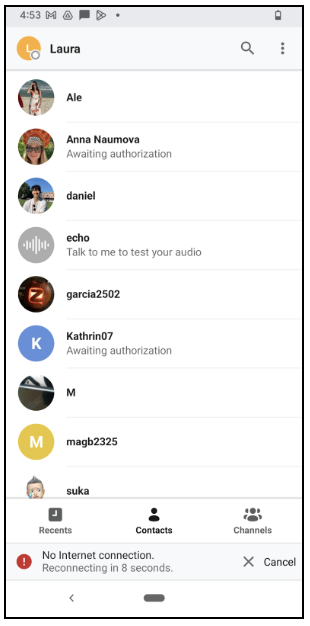
*New icon*
We hope that these changes will improve the experience of all Zello users so you can spend more time connecting!
- [Getting started](https://support.zello.com/zc/getting-started?hsLang=en#main-content)
- [New users](https://support.zello.com/zc/getting-started?hsLang=en#new-users)
- [General information](https://support.zello.com/zc/getting-started?hsLang=en#general-information)
- [Using Zello Friends & Family](https://support.zello.com/zc/using-zello-friends-family?hsLang=en#main-content)
- [Android](https://support.zello.com/zc/using-zello-friends-family?hsLang=en#android)
- [iOS](https://support.zello.com/zc/using-zello-friends-family?hsLang=en#ios)
- [Features](https://support.zello.com/zc/using-zello-friends-family?hsLang=en#features)
- [Channels](https://support.zello.com/zc/using-zello-friends-family?hsLang=en#channels)
- [Contacts](https://support.zello.com/zc/using-zello-friends-family?hsLang=en#contacts)
- [Hardware and accessories](https://support.zello.com/zc/using-zello-friends-family?hsLang=en#hardware-and-accessories)
- [Profile Preferences and Settings](https://support.zello.com/zc/profile-preferences-and-settings?hsLang=en#main-content)
- [Manage account](https://support.zello.com/zc/profile-preferences-and-settings?hsLang=en#manage-account)
- [Zello statuses](https://support.zello.com/zc/profile-preferences-and-settings?hsLang=en#zello-statuses)
- [Settings](https://support.zello.com/zc/profile-preferences-and-settings?hsLang=en#settings)
- [Safety and Privacy](https://support.zello.com/zc/safety-and-privacy?hsLang=en#main-content)
- [Blocking, reporting, and channel moderation](https://support.zello.com/zc/safety-and-privacy?hsLang=en#blocking-reporting-and-channel-moderation)
- [Legal](https://support.zello.com/zc/safety-and-privacy?hsLang=en#legal)
- [Channel blocks and account bans](https://support.zello.com/zc/safety-and-privacy?hsLang=en#channel-blocks-and-account-bans)
- [Account security](https://support.zello.com/zc/safety-and-privacy?hsLang=en#account-security)
- [Privacy](https://support.zello.com/zc/safety-and-privacy?hsLang=en#privacy)
- [Mobile and Desktop Apps](https://support.zello.com/zc/mobile-and-desktop-apps?hsLang=en#main-content)
- [Zello Bridge](https://support.zello.com/zc/mobile-and-desktop-apps?hsLang=en#zello-bridge)
[](https://zello.com)
[mailto:email@email.com](mailto:email@email.com)
Copyright © 2026, Zello