---
title: Forgotten Password/Username
description: For help resetting your password on Zello Work, please reference this support article.
---
[Skip to content](https://support.zello.com/zc/username#main-content)
English
Show submenu for translations

Open main navigation
Close main navigation
- English
Show submenu for translations
- Contact us
Contact us
How can we help you?
- There are no suggestions because the search field is empty.
1. [Zello F&F](https://support.zello.com/zc?hsLang=en)
2. [Profile Preferences and Settings](https://support.zello.com/zc/profile-preferences-and-settings?hsLang=en)
3. [Manage account](https://support.zello.com/zc/profile-preferences-and-settings?hsLang=en#manage-account)
July 6, 2026
# Forgotten Password/Username
This article is written for: ❌ Zello Work ✅ Zello Friends & Family
**For help resetting your password on Zello Work, please reference this [support article](https://paidsupport.zello.com/hc/en-us/articles/26538294778125-Password-Reset).**
### Password Reset
You can reset your password [here](https://zello.com/forgot_password) using the email address associated with your Zello Friends & Family account.
If you cannot access the email address associated with your Zello account, account recovery will not be possible. For security reasons, we cannot manually add or change the associated email address.
In those cases, we suggest creating a new Zello Friends & Family account.
### Username Recovery
Password reset emails also contain your username, so the best way to recover a forgotten username is by following the instructions above.
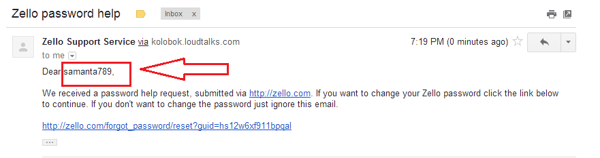
If you have a single Zello Friends & Family account, your username will appear at the beginning of the email.
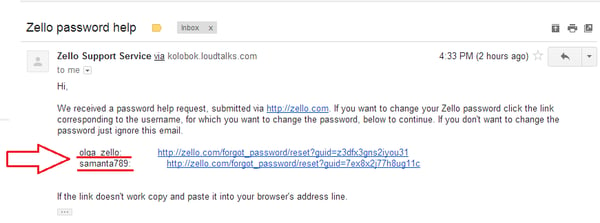
If you have multiple accounts, your usernames will appear in the body of the email.
Due to technical limitations, a maximum of 10 accounts will appear in password reset emails. If an account does not appear in the email, you will not be able to recover it.
- [Getting started](https://support.zello.com/zc/getting-started?hsLang=en#main-content)
- [New users](https://support.zello.com/zc/getting-started?hsLang=en#new-users)
- [General information](https://support.zello.com/zc/getting-started?hsLang=en#general-information)
- [Using Zello Friends & Family](https://support.zello.com/zc/using-zello-friends-family?hsLang=en#main-content)
- [Android](https://support.zello.com/zc/using-zello-friends-family?hsLang=en#android)
- [iOS](https://support.zello.com/zc/using-zello-friends-family?hsLang=en#ios)
- [Features](https://support.zello.com/zc/using-zello-friends-family?hsLang=en#features)
- [Channels](https://support.zello.com/zc/using-zello-friends-family?hsLang=en#channels)
- [Contacts](https://support.zello.com/zc/using-zello-friends-family?hsLang=en#contacts)
- [Hardware and accessories](https://support.zello.com/zc/using-zello-friends-family?hsLang=en#hardware-and-accessories)
- [Profile Preferences and Settings](https://support.zello.com/zc/profile-preferences-and-settings?hsLang=en#main-content)
- [Manage account](https://support.zello.com/zc/profile-preferences-and-settings?hsLang=en#manage-account)
- [Zello statuses](https://support.zello.com/zc/profile-preferences-and-settings?hsLang=en#zello-statuses)
- [Settings](https://support.zello.com/zc/profile-preferences-and-settings?hsLang=en#settings)
- [Safety and Privacy](https://support.zello.com/zc/safety-and-privacy?hsLang=en#main-content)
- [Blocking, reporting, and channel moderation](https://support.zello.com/zc/safety-and-privacy?hsLang=en#blocking-reporting-and-channel-moderation)
- [Legal](https://support.zello.com/zc/safety-and-privacy?hsLang=en#legal)
- [Channel blocks and account bans](https://support.zello.com/zc/safety-and-privacy?hsLang=en#channel-blocks-and-account-bans)
- [Account security](https://support.zello.com/zc/safety-and-privacy?hsLang=en#account-security)
- [Privacy](https://support.zello.com/zc/safety-and-privacy?hsLang=en#privacy)
- [Mobile and Desktop Apps](https://support.zello.com/zc/mobile-and-desktop-apps?hsLang=en#main-content)
- [Zello Bridge](https://support.zello.com/zc/mobile-and-desktop-apps?hsLang=en#zello-bridge)
[](https://zello.com)
[mailto:email@email.com](mailto:email@email.com)
Copyright © 2026, Zello