
Forgotten Password/Username
- Updated
This article is written for: Zello Work Zello Friends & Family.
For help resetting your password on Zello Work, please reference this support article.
Password Reset
You can reset your password here using the email address associated with your Zello Friends & Family account.
If you cannot access the email address associated with your Zello account, account recovery will not be possible. For security reasons, we cannot manually add or change the associated email address.
In those cases, we suggest creating a new Zello Friends & Family account.
Username Recovery
Password reset emails also contain your username, so the best way to recover a forgotten username is by following the instructions above.
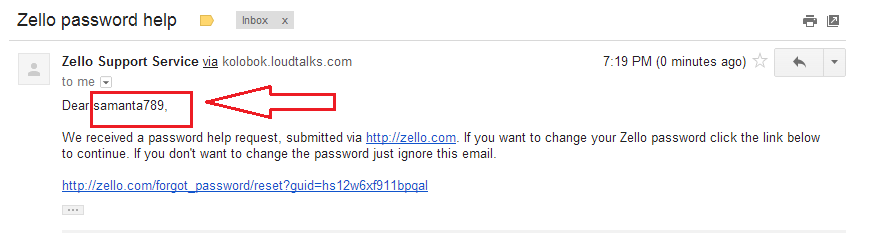
If you have a single Zello Friends & Family account, your username will appear at the beginning of the email.
If you have multiple accounts, your usernames will appear in the body of the email.
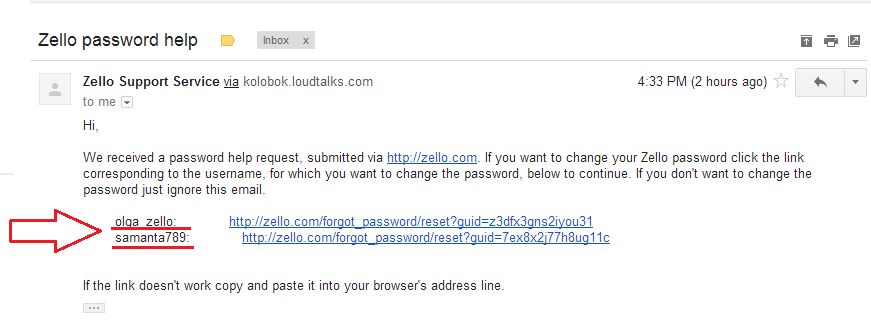
Due to technical limitations, a maximum of 10 accounts will appear in password reset emails. If an account does not appear in the email, you will not be able to recover it.
Was this article helpful?
15 out of 21 found this helpfulArticle is closed for comments.