
This article is written for: ✅ Zello Work ❌ Zello Friends & Family.
Disabling TLS from Zello Management Console
Zello has implemented TLS (Transport Layer Security) to strengthen encryption between all server-client connections.
TLS is turned on by default. Since this setting is vital for the security of your network, we don't recommend disabling TLS unless you're either directed by Zello Support OR you're troubleshooting specific devices on a local network (for example, if you're troubleshooting PC apps on an on-premise server network).
-
Sign in to the management console at [yournetworkname].zellowork.com]. From the taskbar, select Settings.

-
From the right side-bar, select Common. Find the Disable TLS setting, and turn the toggle ON.
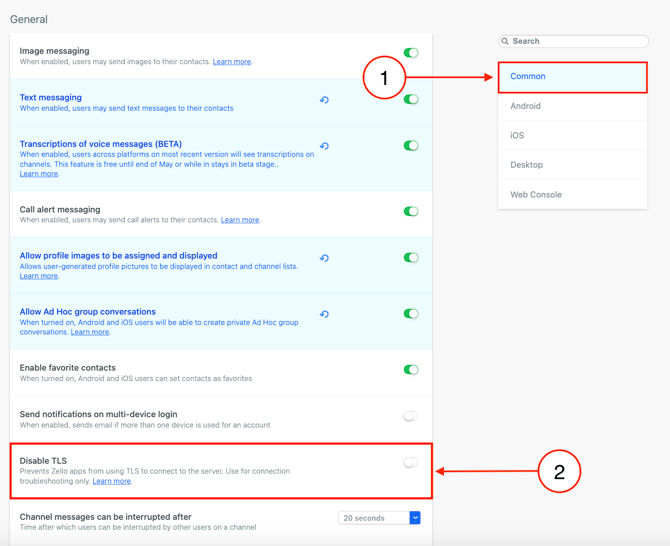
-
Click Save and Apply to implement the change.
Disabling TLS at the device level
On iOS:
- Tap on your profile in the top left corner
- Select Settings -> Support -> Advances settings
- Turn off “Enable TLS”
On Android:
- Tap three dot menu in the top right corner
- Select Options -> Support -> Advanced settings
- Turn off “Enable TLS”
On Legacy PC App:
- In the menu, select Tools -> Options
- In the Zello options dialog select Connection
- Turn off “Enable TLS”