
This article is written for: ✅ Zello Work ❌ Zello Friends & Family.
Zello's location sharing feature allows users to quickly send their current location—both an address and map view—to a contact or channel with the touch of a button. To make this feature available for a network's users, admins must enable it from the management console.
End users: learn more about location sharing.
Enable Location Sharing
Please note: This feature is enabled on the basis of operating system. If your network includes both iOS and Android users, ensure you're turning it on for each OS.
- Sign in to the Management Console at [yournetworkname].zellowork.com.
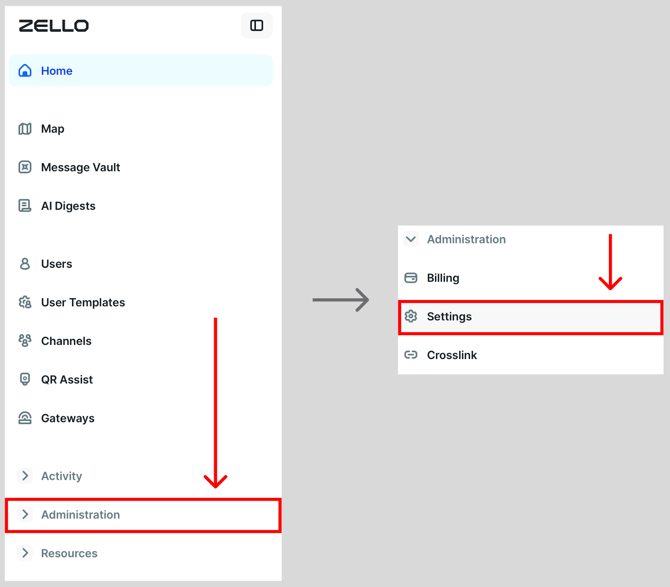
- Select Administration, then Settings.
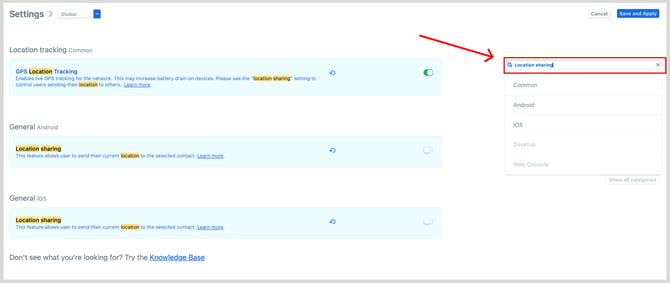
- Use the search bar on the Settings page and search for Location sharing to find the options for both Android and iOS.
-
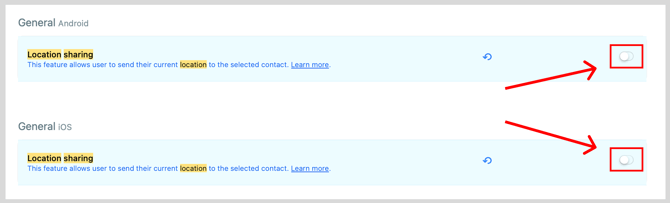
Toggle Location sharing on for iOS and/or Android, depending on which devices you want to share your location from.
Note: A green toggle indicates that location sharing is enabled.
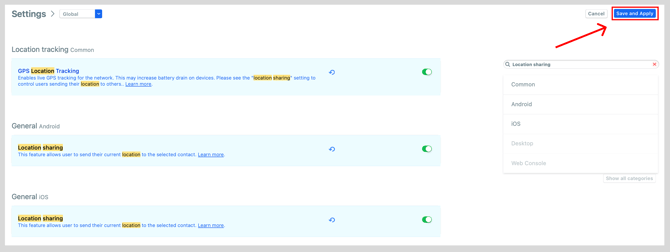
- Click Save and Apply.
Important notes
- In addition to enablement from the console, location sharing requires end-users grant Zello location permissions from their device's settings.
- Location sharing is a message type; a user's location will only be sent to their contacts or channels IF they manually do so. Learn more about what this looks like for the end user here.
- The locations shared through this feature are static—they're representative of a user's location at one point in time. This is not a tracking feature. See this article for information on location tracking.