
This article is written for: ✅ Zello Work ❌ Zello Friends & Family.
Sign-in reports give admins insight into their network's Zello usage. They include the following information for each user in the network:
- Username
- Display name
- Last sign-in date
- Platform
- Zello version
- IP address
- Date of last password update
You can review this information right in the management console, or download it as a CSV file for record-keeping or a security audit.
View the report in the console
- Sign in to the management console at [yournetworkname].zellowork.com.
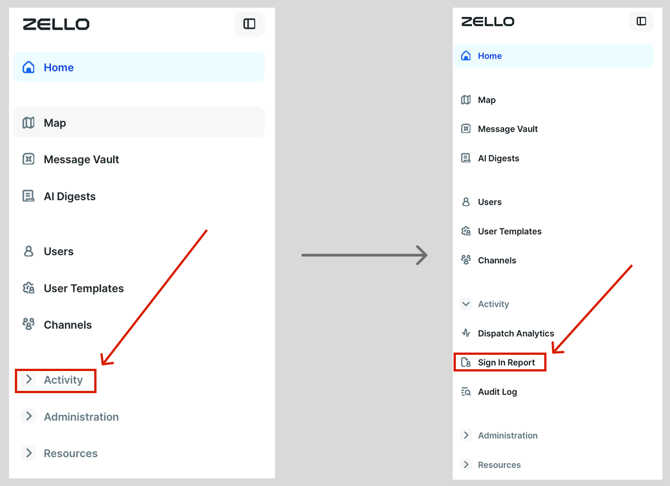
- Click Activity, then select Sign In Report.
 The report opens as a table on screen, with a column for each of the fields listed above.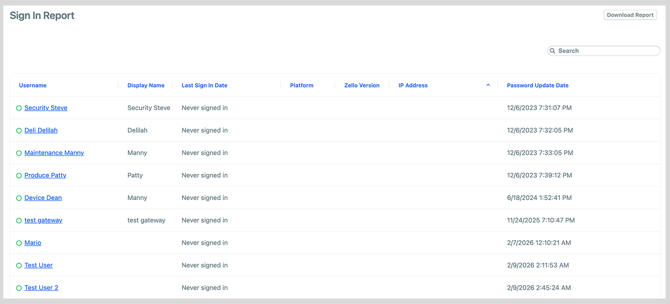
From here you can:
- Sort by any column. Click a column heading to sort ascending or descending, for example to see who signed in most recently or to group users by platform.
- Page through results. If your network has more than 100 users, the report is split across multiple pages. Use the page controls at the bottom of the table to move between them.
This on-screen view is the quickest way to check a single user's last sign-in, platform, or app version without exporting anything.
Note: The Sign In Report reflects users signing in to the Zello app. It does not record admin sign-ins to the management console itself. To review who has accessed the console (with date, time, and IP address), use the audit log on the console Home screen.
Download the report
- From the Sign In Report page, click Download Report in the top-right corner.

- A CSV file of the report downloads to your device, containing all of the fields listed above.