
This article is written for: ✅ Zello Work ❌ Zello Friends & Family.
Zello can automatically transcribe voice messages into text, so your team can read messages when listening isn't an option and skim past conversations to find information quickly. Transcriptions are available for channel and 1:1 messages on Zello Work networks subscribed to the Plus or Enterprise plan.
Note: Transcriptions occur in the Zello environment and always traverse public connections in encrypted form.
Transcriptions are not available on Zello Enterprise Server (ZES), our on-premise deployment.
This article covers how to enable transcriptions, what to expect when using them, how to get the most accurate results, and how transcriptions work with Message Vault.
Setting up Transcriptions on your network
Before you can use transcriptions, they need to be enabled for your network. This section covers the prerequisites and walks you through enabling transcriptions for your network.
Prerequisites
Before you begin, make sure everyone on your network is running a version of Zello that supports transcriptions:
- Channel transcriptions: iOS and Android 5.28 or later, Dispatch Hub 15.14.0 or later
- 1:1 transcriptions: iOS and Android 7.18 or later
(Not sure which version you're on? Here's how to check.)
Enabling Transcriptions
To enable transcriptions for your network, sign in to the Management Console (yournetworkname.zellowork.com) and follow these steps:
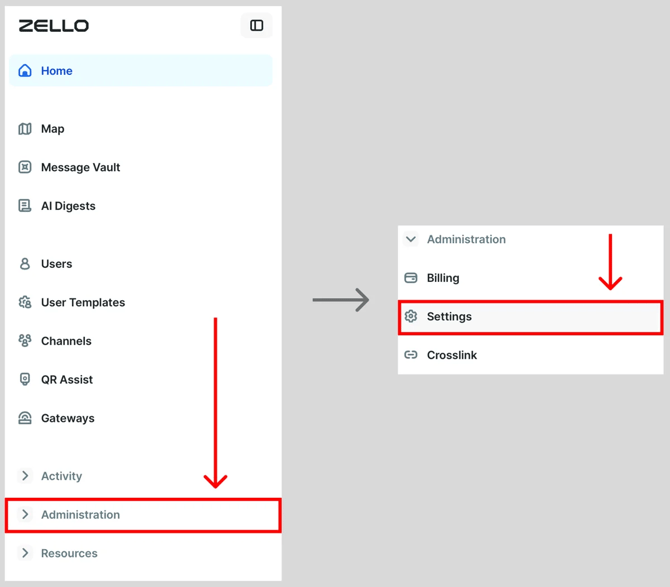
- Select Administration, then select Settings.
- Locate the Channel transcriptions and 1:1 transcriptions settings.
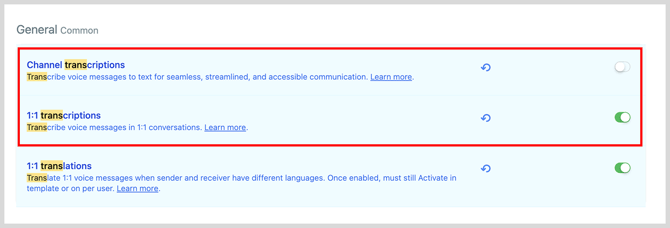
- Use the toggles to enable channel transcriptions, 1:1 transcriptions, or both. Green means transcriptions are enabled.

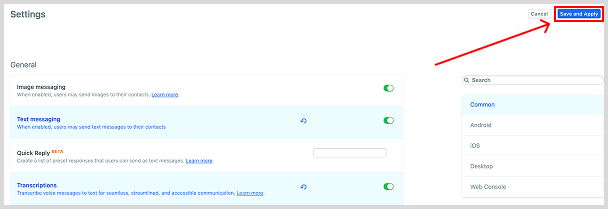
- Click Save and Apply.
Note: 1:1 transcriptions are on by default, including on existing networks. Furthermore, since translations rely on transcriptions, turning off 1:1 transcriptions turns off 1:1 translations. For more information, see Translations.
You can also use user templates to apply channel transcriptions to only certain user accounts. This is useful if transcriptions would distract some users (for example, drivers) but benefit others.
Using transcriptions
Once transcriptions are enabled, every voice message arrives with a text version below it in your history, and a preview appears in your recents. In 1:1 conversations, only the two people in the conversation can see transcriptions in the app. You can still play the original audio whenever you need it.
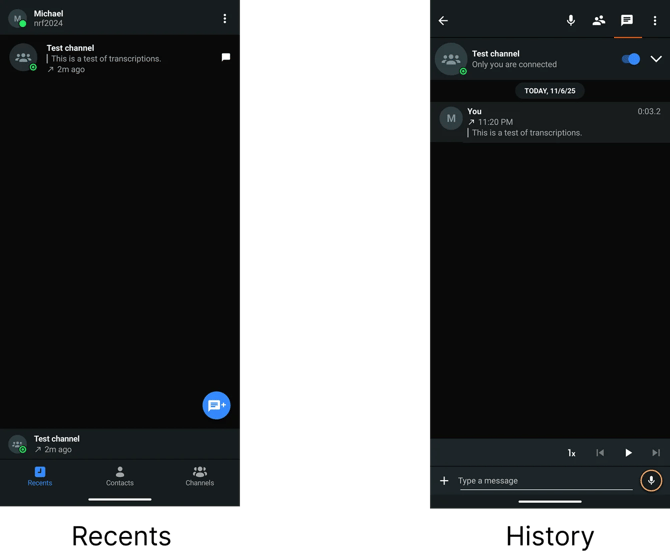
Zello transcribes the first minute of each message in the sender's device language. If a message can't be transcribed, you'll see Transcription unavailable in its place.
Note: If your team sends messages longer than 1 minute, extended transcriptions (up to 5 minutes) can be enabled on request by contacting your Zello account representative.
Getting the most out of transcriptions
Transcriptions make it easy to catch up on a message without replaying the audio. To make sure they're as accurate as possible:
- Speak clearly and at a steady pace.
- Keep background noise down where you can.
- Avoid slang, and spell out uncommon names or terms.
You can also rate any transcription to help us make transcriptions even better over time.
To rate a transcription on iOS, long-press the message and then select a rating.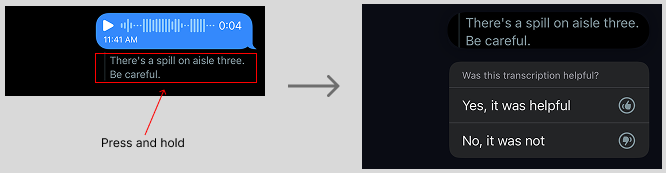
On Android, select the thumbs up icon under the message and then choose your rating.
Please note: You cannot rate transcriptions on Dispatch Hub.
Transcriptions + Message Vault
If Message Vault is included in your Zello Work subscription, transcriptions for each voice message will appear in the Management Console's Message Vault tab. Please note that this is controlled by your defined console settings, and will only occur if transcriptions have been turned on for the user in question.
Transcriptions of 1:1 messages are kept for the same retention period as their audio and are deleted when the audio is deleted.
Additionally, transcriptions will be included in any metadata exports conducted from the Management Console.